Cookie Policy
Tata Consultancy Services Limited and all its affiliates in various countries around the world (“TCS”, “Tata Consultancy Services” or “we”) use cookies (small text files placed on your device) and similar technologies to provide better user experience on our website and to help collect data for proper functioning of our website. The text in a cookie often consists of a string of numbers and letters that uniquely identifies your computer, but it can contain other information as well.
Our Use of Cookies and Similar Technologies.
Tata Consultancy Services uses cookies and similar technologies for purposes, such as:
- Storing your Preferences and Settings. Settings that enable our website to operate correctly or that maintain your preferences over time may be stored on your device.
- Sign-in and Authentication. When you sign into our website using your credentials, we store a unique ID number, and the time you signed in, in an encrypted cookie on your device. This cookie allows you to move from page to page within the site without having to sign in again on each page. You can also save your sign-in information so you do not have to sign in each time you return to the site.
- Identifying the session.
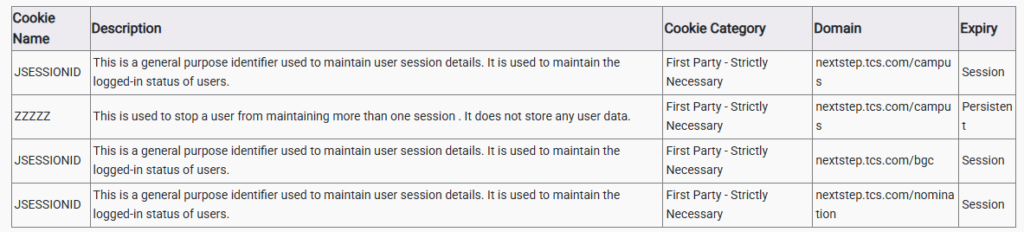
If you visit our website, the site may set some or all of the following cookies:
How to Control Cookies
You can set your browser:
- To allow all cookies
- To allow only ‘trusted’ sites to send them
- To accept only those cookies from websites you are currently using.
We recommend not to block all cookies because https://nextsteptcs.com website uses them to work properly. Please make a note that deleting and blocking cookies will have an impact on your user experience as parts of the site may no longer work. Unless you have adjusted your browser settings to block cookies, our system will issue cookies as soon as you visit our site.
Please read below points to find out how to manage cookies in the major browsers.
Google Chrome:
Click on the “Menu” tab in the upper-right corner and then click on “Settings”.
To block cookies:
Settings → Click on “Advanced” to expand → Under Privacy and Security, Click on “Content Settings” → Click on “Cookies” → To block cookies, Click on toggle button next to this line “Allow sites to save and read cookie data (recommended)” → This will block the cookies.
To check cookies:
Settings → Click on “Advanced” to expand → Under Privacy and Security → Click on “Content Settings” →Click on “Cookies” → See all cookies and site data → Click on the website and check the cookies used in that particular site.
Mozilla Firefox:
Click on the Menu tab in the upper-right corner → Click on Options → In the left side navigation, Click on Privacy and Security → Under History, Select “Use Custom setting for history” from the Drop down → Click on Show Cookies Buttons → Select the file which you want to remove and then click on remove selected button.
Safari:
Open Safari → Click on Preferences from Safari menu → Go to Privacy tab ? Click on “Remove all Website data” to remove all the stored data → Click Remove now button from the pop-up → Click on Details button under “Remove all Website data” → Select the sites you want to remove the data → Click Remove → Click Done.
To find information relating to other browsers, visit the browser developer’s website.

About TCS Next Step | Privacy Notices | Cookie Policy | Disclaimer | Browser Compatibility | Accessibility Statement | Help & Support
Application name Release Version: 12.2 | ©2026 Tata Consultancy Services Limited